We've added the ability for recipe authors to customize the completion message, suggested next recipe label, and next recipe button text shown in the finish modal, giving you full control over how users are greeted at the end of a recipe.
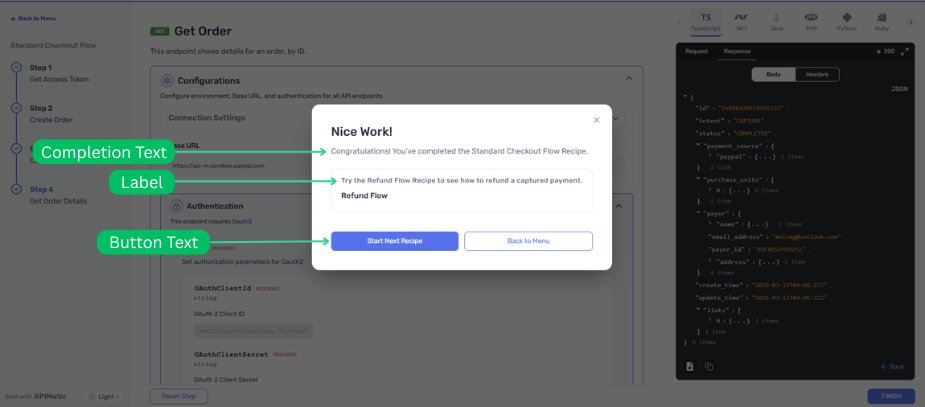
What's Changed?
Building on the Enhanced API Recipe Completion Flow, the finish modal now supports three additional text customizations:
Custom Completion Message
The modal description was previously fixed to "You've successfully completed <recipe name> recipe." — can now be replaced with any message that fits your recipe's tone or context.
The modal description initially displays up to 170 characters. If the message exceeds this limit, the text is truncated and a "...more" button appears inline, allowing users to expand the completion message.
Custom Next Recipe Label
The label above the suggested next recipe card, previously hardcoded as "Suggested Next Recipe", can now be set to any text. This is useful when the relationship between recipes isn't strictly sequential — for example, "Related Recipe" or "Continue Your Journey".
The label text displays up to 170 characters. If the label exceeds this limit, the text is truncated and a "...more" button appears inline, allowing users to expand the label.
Custom Next Recipe Button Text
The button that navigates to the next recipe, previously labeled "Start Next Recipe", can now display any text. This lets you match the button wording to the nature of the next step — for example, "Start Advanced SMS" or "Try OAuth 2.0".
Button text is capped at 25 characters. If the provided text exceeds this limit, it is automatically truncated with an ellipsis (e.g., "Start Your Next Inte...") and the full text appears on hover.
Configuring the Custom Text
All options are set on the final step of a recipe alongside the existing nextRecipe and showConfettiAnimation fields.
"Step 5": {
  name: "Complete",
  stepCallback: async () => {
    return workflowCtx.showContent("Well done!");
  },
  showConfettiAnimation: true,
  completionMessage: "You're all set! Your integration is ready to go.",
  nextRecipe: {
    name: "OAuth 2.0 Authentication",
    link: "page:recipes/oauth2-auth",
    label: "Continue Your Journey",
    buttonText: "Try OAuth 2.0",
  },
}
All three fields — completionMessage, nextRecipe.label, and nextRecipe.buttonText — are optional. When omitted, the modal falls back to the default text. For full details, see the Advanced Features reference. If you're new to API Recipes, start with the overview.