A new ConfigureComponentSorting codegen setting is now available, providing independent sorting control for each API component type in generated SDK docs and API Portals.
What's New?
- Per-component sort control: Configure sorting independently for endpoint groups, endpoints, webhook groups, webhook events, callback groups, callback events, and models, all within a single
ConfigureComponentSortingobject - Multiple sort modes: For endpoints, webhook events, and callback events, choose between
"None","Alphabetical", or"HttpMethod"ordering
Codegen Setting: ConfigureComponentSorting
"info": {
    ...,
    "x-codegen-settings": {
        "ConfigureComponentSorting": {
            "SortEndpointGroups": true,
            "EndpointSorting": "HttpMethod", // Options: "None", "Alphabetical", "HttpMethod"
            "SortWebhookGroups": true,
            "WebhookEventsSorting": "Alphabetical", // Options: "None", "Alphabetical", "HttpMethod"
            "SortCallbackGroups": true,
            "CallbackEventsSorting": "Alphabetical", // Options: "None", "Alphabetical", "HttpMethod"
            "SortModels": true
        }
    }
}
All fields are optional. Omitted fields preserve the order defined in the API specification.
Before and After
- Before
- After
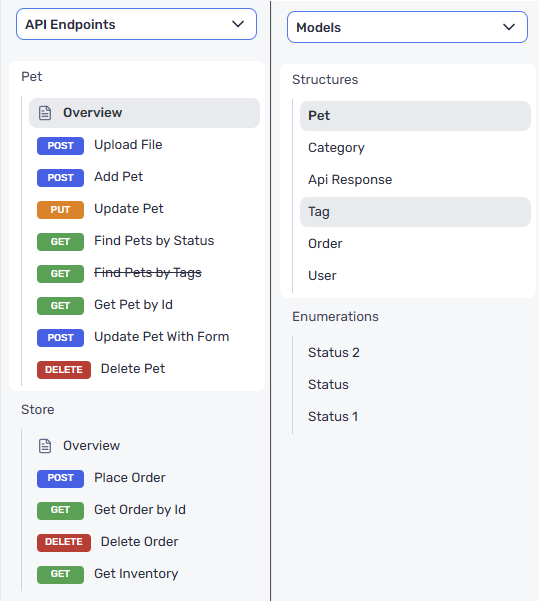
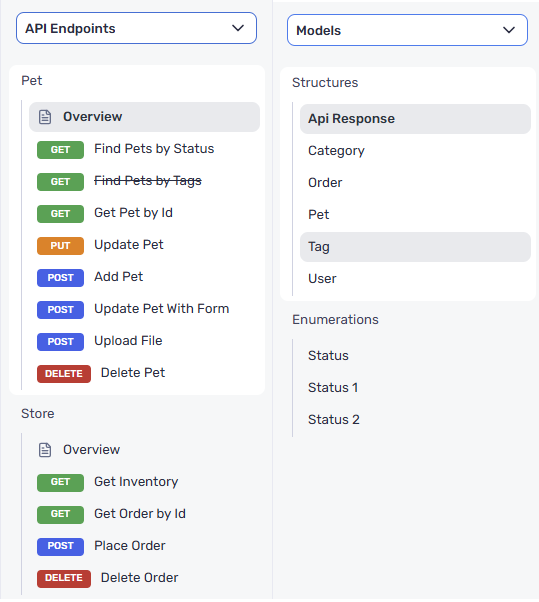
For more information on ConfigureComponentSorting, see Configure Component Sorting.
Impact
ConfigureComponentSorting gives fine-grained control over resource ordering across all SDK documentation output:
- Endpoint groups and endpoints can be sorted alphabetically or by HTTP method, making large APIs easier to navigate
- Webhook and callback groups and events are fully supported with the same sorting options as endpoints
- Models can be sorted alphabetically for a predictable and uniform SDK structure
- Selective sorting lets you target only the components relevant to your workflow, giving you full control over what gets reordered across regenerations