APIMatic's SDKs are now fully customizable. You can add your own code to any generated SDK, inluding new files, custom logic and extra dependencies. Your changes are preserved and persist across generations.
Custom code injection is supported across all APIMatic SDK languages: C#, Java, TypeScript, PHP, Python, Ruby, and Go.
What this unlocks
Generated SDKs are now a starting point you can build on, not a finished artifact you have to work around. APIMatic tracks the difference between generated code and your modifications, and reapplies your customizations automatically every time you regenerate. If your changes conflict with updates to the generated code, the CLI walks you through resolving them. Its the same way you'd resolve a Git merge conflict.
With custom code injection, you can:
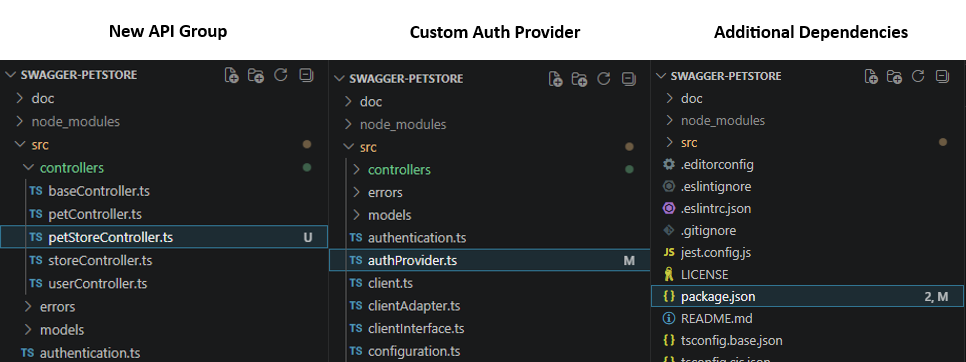
- Add custom authentication providers, utility files, or helper methods
- Extend generated models with business logic
- Modify
package.json,.csproj, or other config files to add dependencies - Integrate with internal systems or third-party libraries
All of this survives regeneration. No manual patching required.
How it works
1. Generate your SDK with change tracking enabled
apimatic sdk generate --language=typescript --track-changes
2. Add your custom code
Modify any generated file or add new ones; custom flows, business logic, extra dependencies, whatever your project needs.
3. Save your customizations
apimatic sdk save-changes --language=typescript
4. Regenerate anytime
apimatic sdk generate --language=typescript
Your customizations are reapplied automatically. If there are conflicts between your changes and the newly generated code, the CLI prompts you to resolve them interactively.
For the full guide, including conflict resolution, CI/CD considerations, and how to revert customizations, see the Custom Code Injection documentation.