SDK Docs Configuration
The following settings help you configure SDK docs.
Disable Docs
Use this setting to disable README file generation for SDKs including any other SDK documentation files.
Usage
To use this feature, you need to specify a Boolean value. By default, its value is set to false.
"info": {
    ...,
    "x-codegen-settings": {
        "DisableDocs": false
    }
}
Language Support
| C# | Java | PHP | Python | Ruby | TS | Go |
|---|---|---|---|---|---|---|
| ✔️ | ✔️ | ✔️ | ✔️ | ✔️ | ✔️ | ✔️ |
Generate Examples for Optional Fields
By default, Docs Generation ignores optional fields when generating examples. Enable this setting to include optional fields during sample value generation in docs.
Usage
To use this feature, you need to specify a Boolean value. By default, its value is set to false.
"info": {
    ...,
    "x-codegen-settings": {
        "GenerateExamplesForOptionalFields": false
    }
}
Language Support
| C# | Java | PHP | Python | Ruby | TS | Go |
|---|---|---|---|---|---|---|
| ✔️ | ✔️ | ✔️ | ✔️ | ✔️ | ✔️ | ✔️ |
Is Latest Version
In the documentation, we mention the specific version number of the SDK being installed. However, if you require a generic document that doesn't reference a specific version, this setting allows you to transform those specific version references into generic ones. This way, you can avoid having to update the document with each release of the SDK.
Enable this setting to hide version number from install commands and package repo links in the docs.
Usage
To use this feature, you need to specify a Boolean value. By default, its value is set to false.
"info": {
    ...,
    "x-codegen-settings": {
        "IsLatestVersion": false
    }
}
Language Support
| C# | Java | PHP | Python | Ruby | TS | Go |
|---|---|---|---|---|---|---|
| ✔️ | ❌ | ✔️ | ✔️ | ✔️ | ✔️ | ✔️ |
Change in Docs
When package publishing is enabled, the Is Latest Version setting will affect the package installation command mentioned in the README file.
| Value | Change |
true | Run the following command from your project directory to install the package from npm: |
false (default) | Run the following command from your project directory to install the package from npm: |
Usage Example Endpoint
Use this setting to choose an endpoint to display its full usage example in the README file.
You can specify Description, EndpointGroupName, and EndpointName.
Usage
To use this feature, you need to specify a UsageExampleEndpoint value as shown below.
"info": {
    ...,
    "x-codegen-settings": {
        "UsageExampleEndpoint": {
            "Description": "Endpoint decsription here",
            "EndpointGroupName": "Calculator",
            "EndpointName": "OperationGet"
        }
    }
}
Language Support
| C# | Java | PHP | Python | Ruby | TS | Go |
|---|---|---|---|---|---|---|
| ✔️ | ✔️ | ✔️ | ✔️ | ✔️ | ✔️ | ✔️ |
Change in Docs
Configuring this setting adds a section Make Calls with the API Client in the Readme.md file of all SDKs. This section contains full file code sample for the endpoint configured in this CodeGen setting.
Sort Resources
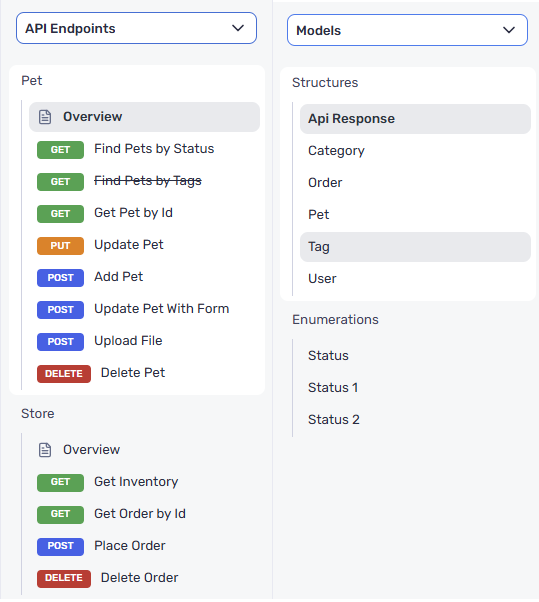
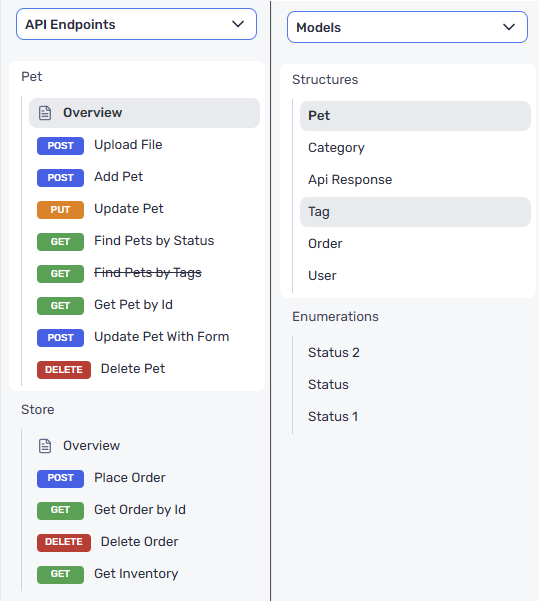
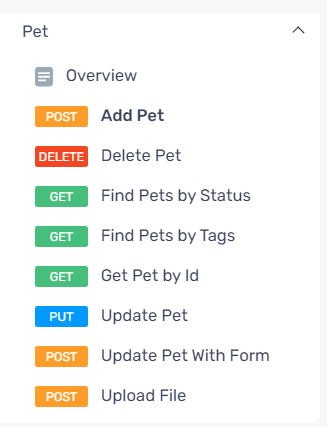
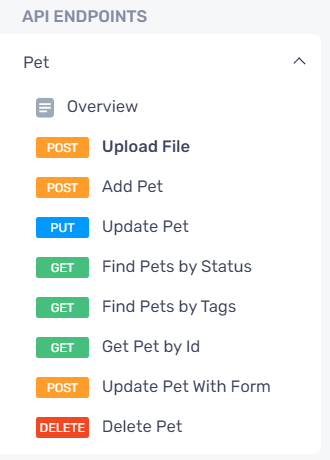
Enabling this setting sorts resources such as endpoints, endpoint groups, and models in the generated documentation. This applies to both README files generated with SDKs as well as DX portal-based documentation.
This setting will override whatever order resources are listed in the OpenAPI specification file.
Usage
To use this feature, you need to specify a Boolean value. By default, its value is set to false.
"info": {
    ...,
    "x-codegen-settings": {
        "SortResources": false
    }
}
Language Support
| C# | Java | PHP | Python | Ruby | TS | Go |
|---|---|---|---|---|---|---|
| ✔️ | ✔️ | ✔️ | ✔️ | ✔️ | ✔️ | ✔️ |
Changes in API Docs
| Value | Change |
true |
|
false (default) |
|
Configure Component Sorting
This setting provides per-component sorting control for generated SDK documentation. It replaces the single SortResources Boolean toggle with a structured configuration object, allowing you to independently sort endpoint groups, endpoints, webhook groups, webhook events, callback groups, callback events, and models.
When ConfigureComponentSorting is specified, it takes precedence over the SortResources setting for the component types it covers.
Usage
To use this feature, you need to specify an object value with the desired sorting configuration. All fields are optional and default to their respective default values if omitted.
"info": {
    ...,
    "x-codegen-settings": {
        "ConfigureComponentSorting": {
            "SortEndpointGroups": true,
            "EndpointSorting": "HttpMethod",
            "SortWebhookGroups": true,
            "SortCallbackGroups": true,
            "WebhookEventsSorting": "HttpMethod",
            "CallbackEventsSorting": "HttpMethod",
            "SortModels": true
        }
    }
}
Configuration Details
| Field | Type | Description | Default |
|---|---|---|---|
SortEndpointGroups | Boolean | Sort endpoint groups alphabetically | false |
EndpointSorting | String | Sort endpoints: "None", "Alphabetical", or "HttpMethod" | "None" |
SortWebhookGroups | Boolean | Sort webhook groups alphabetically | false |
WebhookEventsSorting | String | Sort webhook events: "None", "Alphabetical", or "HttpMethod" | "None" |
SortCallbackGroups | Boolean | Sort callback groups alphabetically | false |
CallbackEventsSorting | String | Sort callback events: "None", "Alphabetical", or "HttpMethod" | "None" |
SortModels | Boolean | Sort models alphabetically | false |
For the EndpointSorting, WebhookEventsSorting, and CallbackEventsSorting fields, the following values are supported:
"None": No sorting applied (preserves the order from the API specification)"Alphabetical": Sort alphabetically by name"HttpMethod": Sort by HTTP method (GET, POST, PUT, DELETE, etc.), then alphabetically
Language Support
| C# | Java | PHP | Python | Ruby | TS | Go |
|---|---|---|---|---|---|---|
| ✔️ | ✔️ | ✔️ | ✔️ | ✔️ | ✔️ | ✔️ |
Changes in API Docs
| Value | Change |
| Configured (see Usage Details) |
|
| (default) |
|